1. Stage Progressions
This table shows how prospects are moving through your funnel, helping you identify which stages are performing well and where drop-offs may be occurring.
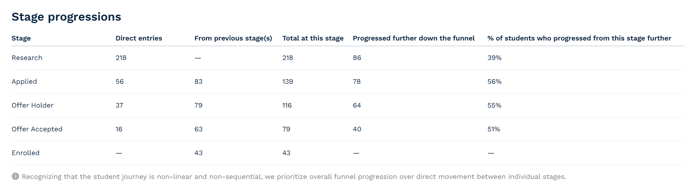
This table shows how prospects are moving through your funnel, helping you identify which stages are performing well and where drop-offs may be occurring.
You’ll see:
You’ll see:
- Direct entries – how many prospects signed up at this stage
- From previous stage(s) – how many progressed to this stage after signing up earlier
- Total at this stage – the combined number of prospects here
- Progressed further – how many moved on to a later stage
- % progressed – the proportion of sign-ups at this stage who moved forward
TAP recognises that student journeys are often non-linear. That’s why the report focuses on overall funnel progression rather than strict stage-to-stage movement — giving you a more realistic view of how students engage.
2. Impact on Student Experience
To help you understand the quality of engagement, TAP asks students who’ve progressed to a later stage how the service influenced their decision-making.
Depending on the stage they reach, they’ll be asked:
- Do you feel more informed after using this service?
- Did this service influence your decision to apply?
- Do you feel more confident as a result of using this service?

Students can also leave free-text feedback, giving you qualitative insights into what’s working and what could be improved.

3. ROI Calculator
This tool helps you estimate the financial return TAP is delivering — based on your inputs and student-reported outcomes.
You’ll enter:
- Your TAP licence cost and currency
- Ambassador hourly rates
- Number of actively engaged staff
- Weekly hours spent on TAP
- Your average tuition fee
The calculator will then estimate:
- Enrolments (based on student self-reporting — editable for accuracy)
- Annual tuition revenue
- Dropout reduction impact
While TAP provides a strong starting point, your CRM will often be the more complete source of truth. You’re encouraged to adjust the calculator inputs and share feedback to help improve future versions.