🧭 What is a Group Account?
A Group Account is a high-level admin view that links multiple TAP Admin Dashboards. It’s ideal for institutions with multiple brands, campuses, or network centres that want both central oversight and local autonomy.
Group Admins can:
View combined reporting across all linked dashboards
Access Promotions and Settings centrally
Switch between individual dashboards via a dropdown menu
Promote a Group Feed that showcases ambassadors and content from all accounts
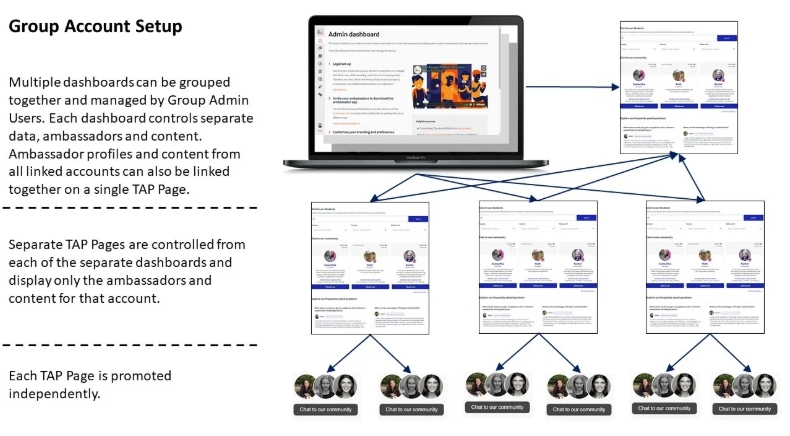
Individual admins can:
Be added to specific dashboards
Only see data, ambassadors, and content relevant to their assigned account
📊 What can you do with a Group Account?
Centralised Reporting
View total prospect engagement across all dashboards
Filter by individual dashboard using the dropdown menu
Unified Promotion
Use the Promotion tab to set up pop cards or tracked links
Direct prospects to a Group Feed that combines ambassadors and content from all accounts
Flexible Admin Access
Add admins at the Group level for full oversight
Add admins at the individual dashboard level for localised control
🧑💼 Why use a Group Account?
This setup is ideal for:
Institutions with multiple brands or campuses
Network centres that want to run TAP independently
Teams that need shared visibility but localised management
It enables:
Independent promotion by each brand or centre
Custom ambassador teams per dashboard
Centralised strategy with decentralised execution