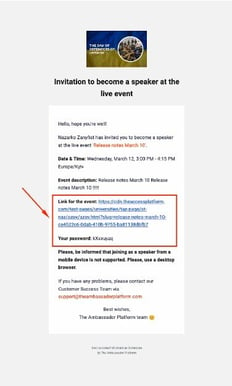
📩 What does the invite email look like?
- Sent from: [email protected]
- Includes: Event link and password
- Audience: Ambassadors, External Speakers
🛠 Troubleshooting: Speaker didn’t receive the email
- Ask them to check their spam folder — the email may have been filtered.
- If still missing, follow these steps to manually share the link:
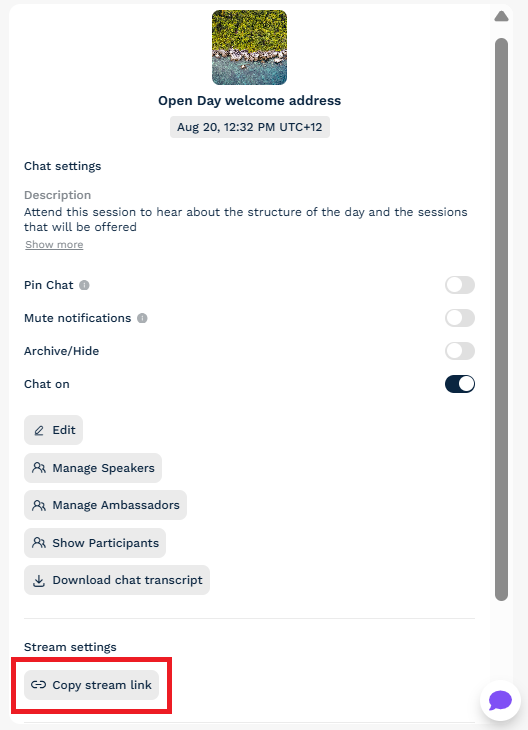
How to copy and share the stream link:
- Go to your admin dashboard
- Click into the event under Streams
- Click Copy Stream Link from the control panel
This universal link works for all user types - the system will detect whether the person is an ambassador, speaker, or prospect and show the correct experience.
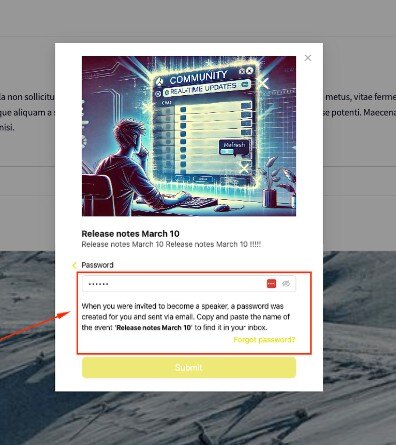
🔐 What if the speaker doesn’t know their password?
- Please note that a speaker will receive a unique password for each stream they are invited to. This means that if they have been invited to multiple streams, the latest password is the one that will work.
- Ask them to click Forgot Password on the login screen.
- A reset link will be emailed to them immediately:
If your speaker hasn't received the new password link or requires any assistance when navigating these steps, please email [email protected] for further advice.